Camera endoscope | USB
Publisher Description


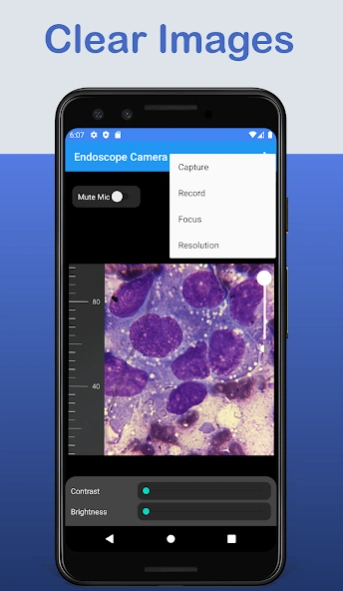

Endoscope Camera , connect a USB scope camera to your phone .
Endoscope camera to connect with endoscope camera or any device like USB camera or Borescope camera there is many devices use external cam like inspection camera sewer.
Check that before using this endoscope app sewer inspection camera:
1- if your device supports USB otg technology you can use many apps I recommend it this app USB otg checker
2- if Your USB camera is UVC-compatible
How does it work endoscope app?
The endoscope app for android - endoscope camera open your external Borescope by USB otg and read it the endoscope app need to use micro just to record video with sounds and need to use the gallery to write and read it pictures and videos
How to use this app ?
Endoscope app for android open the app and enter the USB of his endoscope camera in your phone click on the camera icon click on ok now you can see the endoscope camera is working.
In what you can use the endoscope camera device ?
the Borescope or endoscope has many things to do like in blocked drains you can see what inside You will not need camera drain unblocker or plumbing repair anymore. it works like a sewer camera Borescope
About Camera endoscope | USB
The company that develops Camera endoscope | USB is AIOO inc. The latest version released by its developer is 1.0 .
To install Camera endoscope | USB on your Android device, just click the green Continue To App button above to start the installation process. The app is listed on our website since 2026-08-29 and was downloaded 84 times. We have already checked if the download link is safe, however for your own protection we recommend that you scan the downloaded app with your antivirus. Your antivirus may detect the Camera endoscope | USB as malware as malware if the download link to com.AIOOSoft.Endoscope is broken.
How to install Camera endoscope | USB on your Android device:
- Click on the Continue To App button on our website. This will redirect you to Google Play.
- Once the Camera endoscope | USB is shown in the Google Play listing of your Android device, you can start its download and installation. Tap on the Install button located below the search bar and to the right of the app icon.
- A pop-up window with the permissions required by Camera endoscope | USB will be shown. Click on Accept to continue the process.
- Camera endoscope | USB will be downloaded onto your device, displaying a progress. Once the download completes, the installation will start and you'll get a notification after the installation is finished.
Program Details
System requirements
Download information
Pricing
Version History
version
posted on 2026-08-29
version 6
posted on 2022-04-07
Fix app Crash when plug in the USB camera for some devices.
version 4
posted on 2021-11-22
Fixing missing debugging instructions and limit ads showing.
